
The Story of Tayf: Building a Native Lottie Viewer in Rust
8 minutes read
Table of contents
- The problem
- The first prototype: animaview and the webview trap
- The radical pivot: pure Rust, GPUI, and ThorVG
- How rendering works under the hood
- Zero-copy video and GIF export
- Desktop integration: Linux accents, Wayland, and RTL
- Live vector palette recoloring
- The honest downsides of Rust and GPUI
- AI disclosure
- What is next
The problem
Whenever a designer hands off an animation for an app or website, it almost always arrives as a .json or .lottie file.
On Linux, previewing that file should feel as simple as double-clicking a PNG: open instantly in a native window, hit space to play, scrub through keyframes, inspect dimensions and frame rate, toggle dark and light backgrounds, and close it.
Instead, the workflow was frustratingly clumsy:
- Upload to online viewers (like LottieFiles): Uploading unreleased client assets or internal app animations to a third-party cloud service just to check a 3-second spinner is a privacy and security headache.
- Local browser hacks: Spinning up a local development server or writing a boilerplate HTML file with
<dotlottie-player>in a browser tab. - Heavy design tools: Booting a resource-heavy editor that takes 15–20 seconds to load just to check a quick vector animation.
There was simply no dedicated, fast, lightweight desktop player for Linux that treated Lottie files like first-class media assets.
So I decided to build my own. It is called Tayf (“طيف” .. Arabic for Spectrum or Phantom). Today, it is a standalone, GPU-accelerated desktop application written in 100% native Rust. It starts in milliseconds, uses ~30 MB of RAM, supports both standard Lottie JSON and DotLottie ZIP archives, exports to MP4 and GIF, and supports live vector palette recoloring.
Getting here, however, required throwing away my entire first prototype.
The first prototype: animaview and the webview trap
Like many developers looking to ship a desktop utility quickly, I reached for tools I already use daily in web development (like Svelte web applications): Tauri 2 + Svelte 5 paired with @lottiefiles/dotlottie-svelte.
I initially codenamed the project animaview. Within a few days, I had a working prototype running as an AppImage.
It worked on paper. But the moment I started using it as my daily driver on Linux, the webview architecture felt completely misaligned with what an image viewer should be:
- The IPC plumbing tax: Every time a file opened, the Rust backend read bytes from disk, serialized them across the IPC bridge to JavaScript, which then converted them into an object URL via
URL.createObjectURL(blob). - Event-loop latency: Every single playback event (
frame,play,pause,timeupdate) crossed the WebKit process boundary. Scrubbing a 60 FPS animation created an unnecessary storm of IPC messages and DOM updates. - The WebKitGTK Linux packaging hell: If you build desktop apps for Linux with webviews, you know the pain of WebKitGTK. Distros ship drastically different versions, Wayland fractional scaling sometimes produces weird blurriness, and bundling WebKitGTK into a truly portable AppImage that runs across Ubuntu, Fedora, and Arch is notoriously brittle.
- Runtime bloat: Spawning a multi-process browser engine with Vite, Tailwind, bits-ui, and Node runtime dependencies consumed 150–250 MB of RAM for an empty window.
I did not want a web browser disguised as an image viewer. I wanted a true, native binary.
The radical pivot: pure Rust, GPUI, and ThorVG
I scrapped the entire frontend and restarted from scratch in pure Rust. The new architecture stands on two pillars:
- GPUI: The GPU-accelerated 2D UI framework developed by Zed Industries for their editor. Full programmatic control over windowing, layout, and text rendering .. no HTML or CSS engine.
- ThorVG: A high-performance, lightweight C++ vector graphics library with native Lottie and SVG rasterization, compiled via Rust FFI (
thorvg-syswith vendored sources).
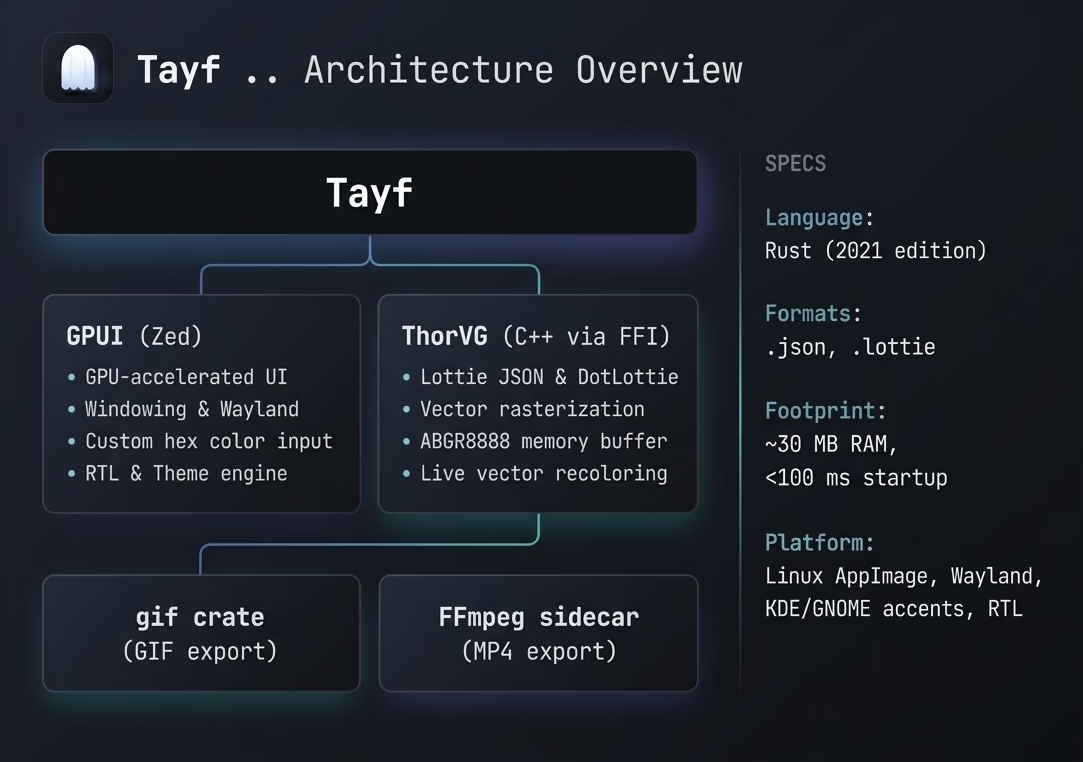
With this combination, startup dropped from multiple seconds to instant (<100 ms), baseline memory fell to ~30 MB, and frames render straight into a pre-allocated buffer and upload directly to GPU textures .. zero serialization, zero IPC.

How rendering works under the hood
Tayf handles both plain .json files and .lottie packages (ZIP archives containing a manifest, animation JSONs, and optional image assets). Before handing anything to ThorVG’s C++ FFI, it runs strict structural validation .. checking for Lottie markers like "v", "layers", "fr", and "w" .. so dragging a random package.json into the window shows a friendly error modal instead of a crash.
ThorVG rasterizes vector frames into an ABGR8888 software buffer. Tayf scales the render dimensions by the window’s HiDPI scale factor (clamped to 4096px) so animations stay crisp on 4K displays. If the canvas size hasn’t changed between frames, the existing buffer is reused with zero heap allocations.
Shortly after getting the render loop working, I hit a critical bug: scrubbing for 30 seconds ballooned VRAM past 1 GB. GPUI’s paint_image() caches every texture in a sprite atlas .. perfect for static icons, catastrophic at 60 FPS. The fix was calling window.drop_image(prev) before painting each new frame, collapsing memory from an unbounded climb to a constant ~30 MB.
Zero-copy video and GIF export
Tayf never writes intermediate frame files to disk. For MP4 export, it spawns FFmpeg as a child process, pipes raw RGBA frames directly into FFmpeg’s stdin, and closes the pipe with an explicit drop(stdin) so FFmpeg receives EOF and finalizes its container headers.
Two subtle gotchas made this tricky: H.264’s yuv420p chroma subsampling requires even dimensions (Tayf auto-rounds odd sizes up), and forgetting to drop the stdin handle before child.wait() causes FFmpeg to hang indefinitely.
To keep things user-friendly, Tayf discovers FFmpeg across multiple tiers .. system PATH, the folder next to the executable, the ffmpeg-sidecar cache, and standard OS locations .. so users never need to configure paths manually. For GIF export, it uses the pure-Rust gif crate with the same zero-copy frame pipeline.
Desktop integration: Linux accents, Wayland, and RTL
Tayf reads your desktop environment’s accent color on startup .. parsing KDE’s kdeglobals for the AccentColor RGB triplet, or querying GNOME 47+‘s gsettings accent-color and mapping named palette entries to hex values.
On Wayland, AppImages often show a generic icon in the taskbar because the window’s app_id doesn’t match the auto-generated desktop file name (appimagekit_<hash>-tayf.desktop). Tayf solves this by scanning ~/.local/share/applications/ for the actual installed desktop entry and setting its app_id accordingly.
Tayf also includes full Arabic localization (“طيف”) with complete RTL mirroring: flex direction, border separators, rounded corners, and transport controls all flip to match natural right-to-left scanning order. Language switching is instant at runtime via rust-i18n.
Live vector palette recoloring
One of Tayf’s most useful features is live vector palette recoloring .. replacing colors in a Lottie animation directly on the desktop, locally and non-destructively, without round-tripping through a web service or After Effects.
The tricky part is that colors in a Lottie JSON are scattered across solid fills, strokes, gradient fills, gradient strokes, animated keyframes, and pre-composition assets. Gradients are especially treacherous: the g.k array flattens color stops and opacity stops into one continuous float array. Naively parsing it in 4-float chunks corrupts transparency. Tayf reads the stop count property ("p"), extracts only the first count × 4 floats as RGB, and leaves opacity stops untouched.
Once colors are rewritten in memory, ThorVG refuses to hot-reload new JSON into an existing picture object. Tayf works around this by treating ThorVG instances as immutable: it creates a fresh animation/canvas/picture triple, swaps it in atomically, and destroys the old one only after the replacement succeeds.
Users can apply built-in preset palettes (Sunset, Ocean, Forest, Candy, Mono), tweak individual colors with a custom HSV color picker, and restore the original artwork with one click. Exports .. MP4, GIF, and raw .json .. all respect the current recoloring.
The honest downsides of Rust and GPUI
- Compilation times: A clean release build of GPUI + vendored ThorVG takes several minutes. No instant HMR like Vite.
- Disk footprint during development: The
target/directory routinely grows to 2–3 GB. - No free UI widgets: Need a color picker, slider, or text input? You build the entire editing engine from first principles .. text shaping, blinking caret, cursor navigation, selection, clipboard .. a humbling reminder of how much browser engines do for us.
Yet every time I open a 20 MB Lottie file, scrub smoothly at 60 FPS without dropping a frame, and see the entire app idling at 1% CPU and ~30 MB of RAM .. the tradeoff feels completely worth it.
AI disclosure
In the spirit of open transparency: most of the implementation code in Tayf was generated by AI coding agents under my direct supervision and architectural guidance.
My role focused on designing the architecture and state model, diagnosing platform-specific edge cases (the sprite atlas leak, Wayland app IDs, text input event handling), defining FFI safety boundaries around ThorVG’s C pointers, and designing the UX, color palettes, RTL layout, and packaging scripts.
What is next
Tayf is currently distributed as a standalone Linux AppImage (Ubuntu 22.04+ compatible). On the roadmap: macOS & Windows support, batch folder conversions to MP4/GIF, and layer hierarchy inspection with per-layer visibility toggles.
- GitHub: github.com/amr3k/tayf
- Releases: github.com/amr3k/tayf/releases
- Website: tayf.a3k.me